
This module has been designed to facilitate the bulk download of XML files stored in the bFiskur® vaults to your device. In compliance with various business requirements, it may be necessary to perform such actions. The procedure to initiate the download is simple:
Go to the provided address.

Once inside the system, you can request the required documents by following these steps:
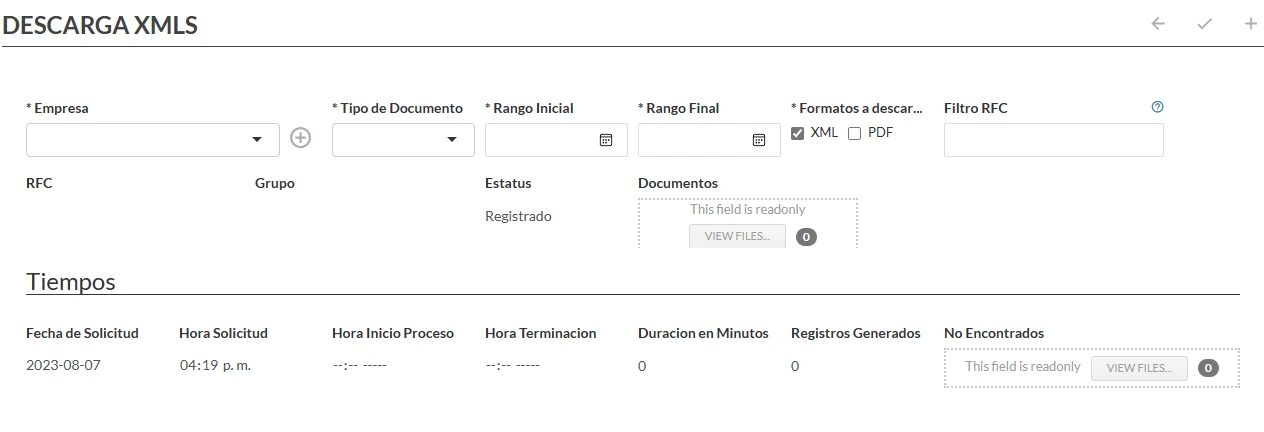
- In the field “Company”, select the entity corresponding to which you wish to perform the download.
- In “Document type”, specify whether you require issued, received, payroll, customer payment files, among others.
- In the fields of “Initial range” and “Final range”, indicate the period from which you need to download the files.
- It is possible to download both XML and PDF files; however, it is recommended to download PDFs only for companies with a low volume of documents, as a high volume can significantly slow down the process.
- To obtain more specific results, you can filter by a specific RFC, either to download CFDIs issued to a specific company or received from the same.
At the end of the process, in the "Documents" field you will find a .ZIP file that contains the downloaded files.