
The Triple reconciliation scenario aims to compare the values of the issued CFDIs, what was declared, what was accounted for, and show the differences.
So, to obtain the information displayed on this dashboard, 3 sources are used:
- The issued vault
- The declaration vault
- The electronic accounting vault.
bFiskur® automatically knows where to take the amounts to display regarding issued and declarations (points 1 and 2). Except for accounting (point 3).
For accounting, since each company may handle a different chart of accounts, it is necessary to tell the platform which accounts to use for each section, this is done by classifying the accounts.
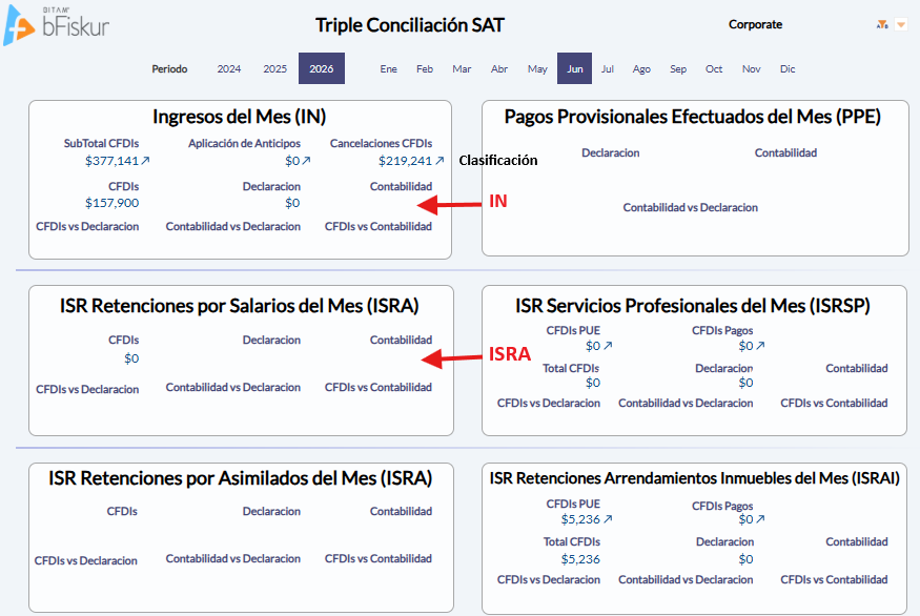
As shown in the following image, several of the fields under the accounting title come from electronic accounting, the dashboard when displayed goes to electronic accounting and takes the values to display considering the classification of the accounts. For example, to fill the value of the field accounting in the section Monthly Income, bFiskur® scans all accounts with the classification IN and displays the total sum of the field Monthly Debtors Amount present in the accounting.
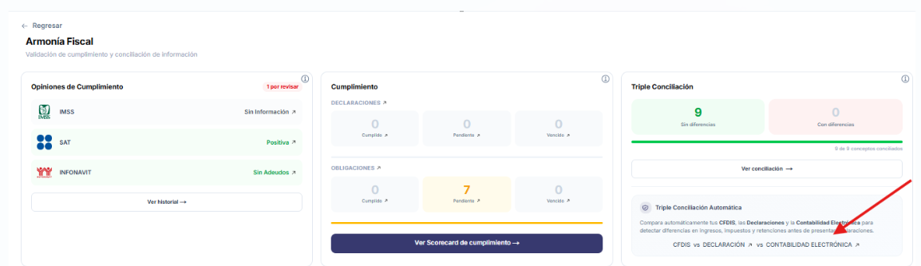
For this dashboard to function correctly, it is necessary to configure the classification corresponding to each account in the electronic accounting. You will find the Electronic Accounting within the Automatic Triple Reconciliation segment.
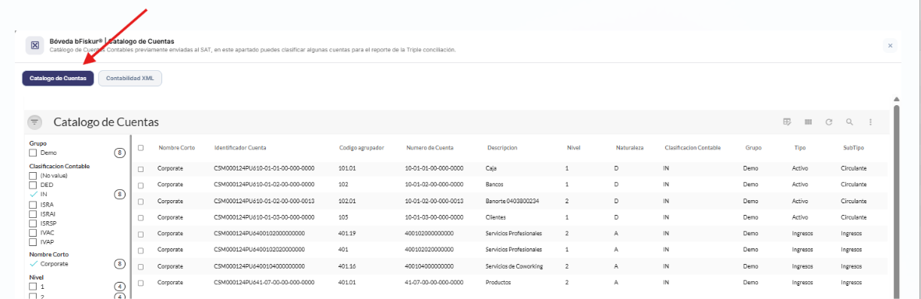
Electronic accounting contains 2 sections: The chart of accounts and the XML accounting. It is in the Chart of accounts where you will need to make the configuration.
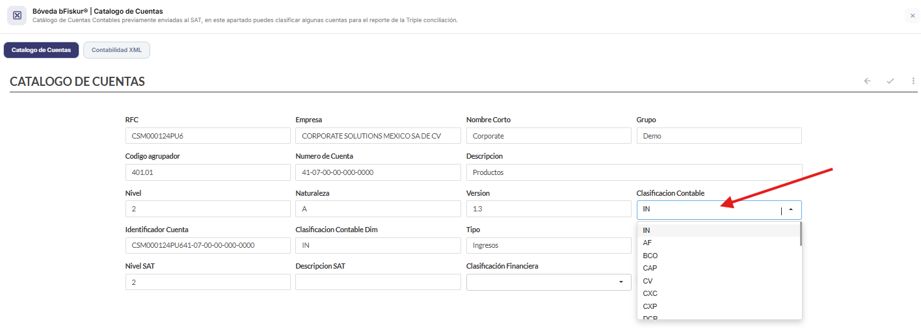
What you need to do is edit those accounts from which the data will be taken and assign them the accounting classification to which the account belongs, according to the list you will find at the end of this document.
Below is the detailed relationship of classifications and fields used for the calculation of the amounts corresponding to the accounting:
Section | Accounting classification | Field from which the values are taken |
Monthly/accumulated income *Note: In the case of income, only the assets are taken into account, and for the canceled, the canceled from the previous year are taken. | IN | Monthly debtors amount |
ISR withholdings for salaries of the month/ accumulated | ISRA | Credit *Grouping code=216.01 |
ISR professional services of the month / accumulated | ISRSP | Credit |
ISR withholdings for assimilated income of the month/accumulated | ISRA | Credit *Grouping code=216.02 |
ISR withholdings for real estate leases of the month/accumulated | ISRAI | Credit |
VAT paid for the month | IVAP | Debit |
VAT collected for the month | IVAC | Credit |
VAT withheld paid for the month | IVARP | Debit |
VAT withheld collected for the month | IVAR | Credit |
Provisional payments made for the month | PPE | Debit |
Table 1. Relationship of the classification of accounting accounts required by bFiskur®︎ according to the section of the report. The column field from which the values are taken does not need to be configured, it is only provided for informational purposes.
IMPORTANT: The previous table shows the accounting classifications used for the Triple reconciliation and they are the only allowed values. All other classifications listed in the catalog are considered for internal use and are available in bFiskur or do not have a defined purpose.